


简介
正则表达式(Regular Expression,简称 regex、RE)是一组描述字符模式的符号规则,用来检索、替换、提取、校验文本。
- 检验工具:Regex101
语法
基本字符
- 普通字符:直接匹配字符本身,如
a、b、1、@等。 - 特殊字符:需要转义才能匹配字符本身,如
. \ * + ? ^ $ ( ) [ ] { } |等。例如,\.匹配.本身。
字符集
[这里面的东西自己填]:匹配[]中写的所有字符中的任意一个字符,可以写汉字数字字母字符。[abc]:匹配字符集中任意一个字符,如[abc]匹配a、b或c。[^abc]:匹配不在字符集中的任意字符,如[^abc]匹配除a、b、c之外的任意字符。[a-z]:匹配一个范围内的字符,如[a-z]匹配任意小写字母。[A-Z]:匹配任意大写字母。[0-9]:匹配任意数字。
预定义字符集
.:匹配任意单个字符(除换行符\n外)。\d:匹配任意数字,等同于[0-9]。\D:匹配任意非数字字符,等同于[^0-9]。\w:匹配任意字母、数字或下划线,等同于[a-zA-Z0-9_]。\W:匹配任意非字母、数字或下划线的字符,等同于[^a-zA-Z0-9_]。\s:匹配任意空白字符,包括空格、制表符\t、换行符\n等。\S:匹配任意非空白字符。
边界匹配
^:匹配字符串的开头。$:匹配字符串的结尾。\b:匹配单词边界,如cat匹配cat,但不匹配concatenate。\B:匹配非单词边界。
1 | import re |
量词
*:匹配前面的元素0次或多次,如a*匹配""、"a"、"aa"等。+:匹配前面的元素1次或多次,如a+匹配"a"、"aa"等,但不匹配""。?:匹配前面的元素0次或1次,如a?匹配""或"a"。{n}:匹配前面的元素恰好n次,如a{3}匹配"aaa"。{n,}:匹配前面的元素至少n次,如a{2,}匹配"aa"、"aaa"等。{n,m}:匹配前面的元素至少n次,最多m次,如a{1,3}匹配"a"、"aa"、"aaa"。
分组与捕获
():分组,用于捕获匹配的内容,也可用于量词的作用范围。(?:...):非捕获分组,仅用于分组,不捕获内容。\1、\2:反向引用,匹配第1个、第2个捕获组的内容。
1 | import re |
解析:正则表达式 (\d+)\s+\1
(\d+):捕获一个或多个数字,存储为第1个捕获组。\s+:匹配一个或多个空格。\1:反向引用第1个捕获组的内容,确保后面的数字与前面捕获的数字相同。
选择
|:表示“或”,如a|b匹配"a"或"b"。
1 | import re |
技巧
贪婪与非贪婪匹配
- 贪婪匹配:默认情况下,正则表达式尽可能多地匹配字符。例如,
.*会匹配尽可能多的字符。 - 非贪婪匹配:在量词后加
?,表示尽可能少地匹配字符。例如,.*?会匹配尽可能少的字符。
eg:默认情况下,正则表达式是贪婪的,可能会导致匹配结果超出预期。例如,<.*>会匹配<tag1>content<tag2>中的整个字符串,而不是单独的<tag1>和<tag2>。解决方法是使用非贪婪匹配<.*?>。
使用转义字符
- 特殊字符需要转义,如
.、*、+等。如果需要匹配这些字符本身,需要在前面加\,例如\.匹配.。
简化复杂正则表达式
- 使用分组
()将复杂的正则表达式拆分为多个部分,便于理解和维护。 - 使用注释模式
(?x),允许在正则表达式中添加注释,例如:1
2
3
4(?x)
\d+ # 匹配数字
\s+ # 匹配空白字符
\w+ # 匹配单词
使用预定义字符集
- 尽量使用预定义字符集(如
\d、\w、\s),而不是手动编写字符集,这样可以减少错误。
边界匹配问题
- 使用
^和$时,需要注意它们的作用范围。如果使用re.MULTILINE标志,^和$会匹配每一行的开头和结尾,而不仅仅是整个字符串的开头和结尾。
量词的使用
- 量词(如
*、+、?)的使用需要谨慎,尤其是当它们与复杂的表达式结合时。例如,.*+可能会导致正则表达式引擎陷入无限循环。
捕获组的使用
- 捕获组
()会捕获匹配的内容,但过多的捕获组会导致性能下降。如果不需要捕获内容,可以使用非捕获组(?:...)。
验证正则表达式
- 在使用正则表达式之前,可以通过在线工具(如Regex101)验证其正确性。
Python使用
导入模块
1 | import re |
常用方法
re.compile(pattern):编译正则表达式,返回一个正则表达式对象。1
regex = re.compile(r'\d+')
re.search(pattern, string):在字符串中搜索第一个匹配的子串,返回Match对象或None。1
2
3match = re.search(r'\d+', 'abc123')
if match:
print(match.group()) # 输出:123re.match(pattern, string):从字符串开头开始匹配,返回Match对象或None。1
2
3match = re.match(r'\d+', '123abc')
if match:
print(match.group()) # 输出:123re.findall(pattern, string):返回所有匹配的子串,返回一个列表。1
2matches = re.findall(r'\d+', 'abc123 def456')
print(matches) # 输出:['123', '456']re.finditer(pattern, string):返回一个迭代器,每次返回一个Match对象。1
2for match in re.finditer(r'\d+', 'abc123 def456'):
print(match.group()) # 输出:123, 456re.sub(pattern, repl, string):替换字符串中匹配的部分。1
2result = re.sub(r'\d+', 'X', 'abc123 def456')
print(result) # 输出:abcX defXre.split(pattern, string):根据正则表达式分割字符串,返回一个列表。1
2parts = re.split(r'\s+', 'abc def ghi')
print(parts) # 输出:['abc', 'def', 'ghi']
标志
re.IGNORECASE:忽略大小写。1
re.search(r'abc', 'ABC', re.IGNORECASE)
re.MULTILINE:多行模式,^和$匹配每一行的开头和结尾。1
re.search(r'^abc$', 'abc\ndef', re.MULTILINE)
re.DOTALL:.匹配所有字符,包括换行符。1
re.search(r'.+', 'abc\ndef', re.DOTALL)
匹配对象
Match.group():返回匹配的整个字符串。1
2match = re.search(r'(\d+)', 'abc123')
print(match.group()) # 输出:123Match.groups():返回所有捕获组的内容,返回一个元组。1
2match = re.search(r'(\d+)-(\d+)', 'abc123-456')
print(match.groups()) # 输出:('123', '456')Match.start():返回匹配的起始位置。1
2match = re.search(r'\d+', 'abc123')
print(match.start()) # 输出:3Match.end():返回匹配的结束位置。1
2match = re.search(r'\d+', 'abc123')
print(match.end()) # 输出:6
实战案例
VSCode内删除标题数字编号
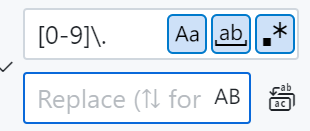
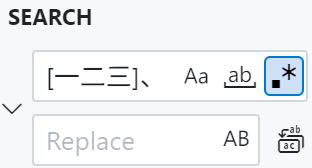
\是为了给.转义,代表数字之后的点,这样之后只剩汉字标题,1.这类数字前缀会消失。
验证邮箱地址
- 需求:验证一个字符串是否为有效的邮箱地址。
- 正则表达式:
1
^[a-zA-Z0-9_.+-]+@[a-zA-Z0-9-]+\.[a-zA-Z0-9-.]+$
- 代码实现:
1
2
3
4
5
6
7
8
import re
def is_valid_email(email):
pattern = r'^[a-zA-Z0-9_.+-]+@[a-zA-Z0-9-]+\.[a-zA-Z0-9-.]+$'
return re.match(pattern, email) is not None
print(is_valid_email("example@example.com")) # 输出:True
print(is_valid_email("invalid_email")) # 输出:False
验证和提取手机号码
- 需求
- 验证手机号码:判断一个字符串是否为有效的中国大陆手机号码。
- 提取手机号码:从一段文本中提取所有有效的手机号码。
中国大陆手机号码规则
- 以
1开头,第二位数字为3-9中的一个。 - 总共11位数字,例如:
13812345678。
- 以
正则表达式
1 | ^1[3-9]\d{9}$ |
^:匹配字符串的开头。1:手机号码以1开头。[3-9]:第二位数字为3-9中的一个。\d{9}:后面跟着9位数字。$:匹配字符串的结尾。代码实现
- 验证手机号码
1 | import re |
- 提取文本中的手机号码
1 | import re |
解释
验证手机号码:
- 使用
re.match从字符串开头开始匹配。 - 正则表达式
^1[3-9]\d{9}$确保整个字符串符合手机号码的格式。
- 使用
提取手机号码:
- 使用
re.findall查找文本中所有匹配的手机号码。 - 正则表达式
\b1[3-9]\d{9}\b中的\b确保匹配的是完整的单词边界,避免部分匹配。
- 使用
注意事项
- 边界匹配:使用
\b确保提取的是完整的手机号码,避免提取到类似138123456789这样的无效号码。 - 性能优化:如果需要处理大量文本,可以使用
re.compile预编译正则表达式以提高效率。
- 边界匹配:使用
提取HTML标签中的内容
- 需求:从HTML字符串中提取
<tag>content</tag>中的content。 - 正则表达式:
1
<(\w+)\b[^>]*>(.*?)</\1>
- 代码实现:
1
2
3
4
5
6
7
8
9import re
html = '<div>Hello <span>World</span>!</div>'
pattern = r'<(\w+)\b[^>]*>(.*?)</\1>'
for match in re.finditer(pattern, html, re.DOTALL):
tag = match.group(1)
content = match.group(2)
print(f'Tag: {tag}, Content: {content}')
替换文本中的日期格式
- 需求:将文本中的日期格式从
YYYY/MM/DD替换为DD-MM-YYYY。 - 正则表达式:
1
(\d{4})/(\d{2})/(\d{2})
- 代码实现:
1
2
3
4
5
6
7import re
text = 'The date is 2023/07/21.'
pattern = r'(\d{4})/(\d{2})/(\d{2})'
replaced_text = re.sub(pattern, r'\3-\2-\1', text)
print(replaced_text) # 输出:The date is 21-07-2023.
分割字符串
- 需求:将字符串按照多个分隔符(如空格、逗号、分号)分割。
- 正则表达式:
1
[\s,;]+
- 代码实现:
1
2
3
4
5
6import re
text = 'apple, banana; orange grape'
parts = re.split(r'[\s,;]+', text)
print(parts) # 输出:['apple', 'banana', 'orange', 'grape']